concepts
Intended Documentation
Tenant Trust Boundary
How Intended enforces tenant isolation through cryptographic trust boundaries and fail-closed defaults.
Tenant Trust Boundary#
Intended is a multi-tenant platform. Each tenant — typically an organization or a distinct business unit — operates within a trust boundary that isolates its policies, keys, tokens, and audit data from every other tenant. This page explains what a trust boundary is, what it isolates, how it is enforced, and what happens when boundary checks fail.
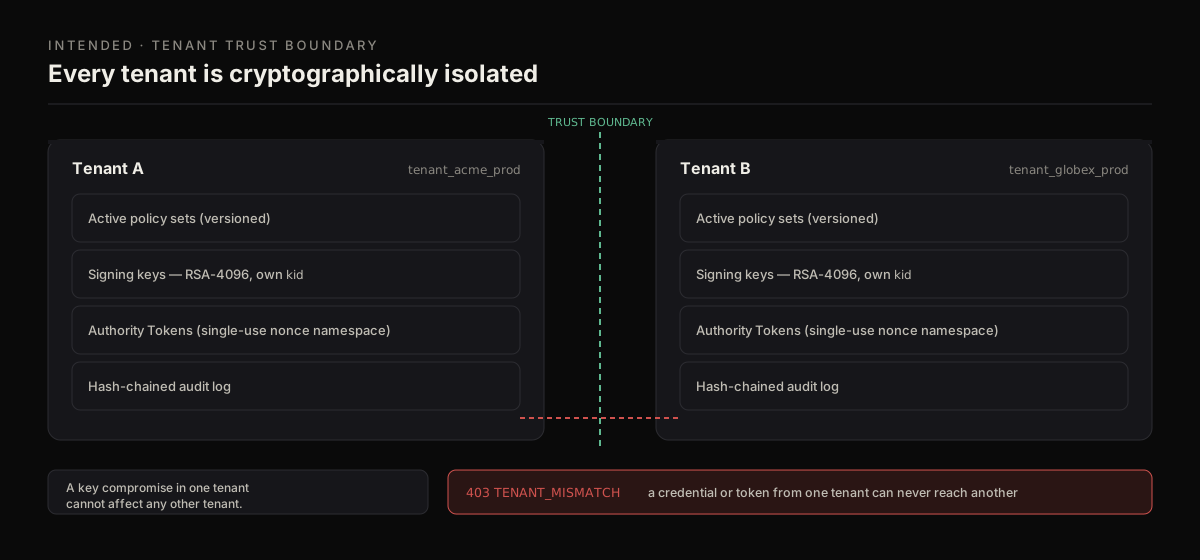
Each tenant's policies, keys, tokens, and audit log are isolated. A credential or token from one tenant can never reach another.
What Is a Trust Boundary#
A trust boundary is a security perimeter that separates one tenant's authorization domain from all others. Everything inside a boundary belongs to exactly one tenant. Nothing crosses a boundary without explicit, verified authorization.
In Intended, the trust boundary is not an abstraction implemented purely through application logic (e.g., filtering database queries by tenant ID). It is enforced through multiple layers, including cryptographic isolation of signing keys, tenant-scoped token claims, and runtime-level request routing.
Info
The trust boundary model builds on the platform's broader Trust Model. This page focuses specifically on the tenant isolation dimension.
What the Boundary Isolates#
Every trust boundary isolates six categories of tenant resources:
1. Policies#
Each tenant defines its own policy set. Policies are stored, versioned, and evaluated entirely within the tenant's boundary.
- A policy created by Tenant A is invisible to Tenant B
- Policy evaluation only considers the requesting tenant's active policies
- There is no concept of a "global" or "shared" policy that applies across tenants
2. Signing Keys#
Each tenant has dedicated cryptographic key material for signing Authority Tokens.
- Private signing keys are scoped to a single tenant (Ed25519, encrypted at rest)
- Public verification keys are distributed per tenant and selected by the token's
kid - Key rotation is independent per tenant; in-flight tokens stay valid via the
kid - A key compromise in one tenant does not affect any other tenant
3. Authority Tokens#
Authority Tokens are bound to the tenant that requested the evaluation.
- The
tenantIdclaim in every token identifies the issuing tenant - A token issued for Tenant A is rejected if presented in Tenant B's context
- Token verification includes a mandatory tenant scope check (see Decision Token Model)
4. Actors#
The actor on a request ({ id, type }, where type is user, service, agent, or system) is interpreted within the requesting tenant's context.
- An actor acting under Tenant A is never resolved into Tenant B
- The request's
tenantIdmust match the tenant the credential resolves to, or the request is rejected - For physical deployments, actuating actors must be explicitly registered in the tenant's actor roster before a token can be issued (see the Physical AI track)
5. Audit Logs#
Every evaluation, token issuance, denial, and administrative action is logged within the tenant's audit scope.
- Tenant A's operators can only query Tenant A's audit logs
- Audit log storage is partitioned by tenant
- Cross-tenant audit queries are not supported, even for platform operators
6. Configuration#
Tenant-level configuration — including token TTL defaults, key rotation schedules, and enforcement mode settings — is scoped to the boundary.
- Tenant A's configuration changes do not affect Tenant B
- Default values are set at the platform level but are overridden per tenant when configured
How Isolation Is Enforced#
Tenant isolation is enforced at multiple layers. No single check is solely responsible — the layers are defense-in-depth.
Layer 1: Request Authentication and Tenant Resolution#
Every API request to the Intended runtime includes a tenant identifier derived from the caller's authentication credentials. The runtime resolves the tenant before any business logic executes.
Authenticate the caller
The runtime validates the caller's credentials (an intended_live_ API key, an Auth0 JWT, or a portal session). Each credential resolves to exactly one tenant.
Resolve the tenant
The runtime extracts the tenant identifier from the authenticated credential. This is not user-supplied — the tenant is determined by the credential itself.
Scope the request
All subsequent operations — policy lookup, key selection, audit logging — are scoped to the resolved tenant. There is no mechanism for a request to reference or affect a different tenant's resources.
Warning
The tenant identifier is derived from the authenticated credential, not from a request parameter. A caller cannot override their tenant scope by passing a different tenantId in the request body. If the request body contains a tenantId that does not match the credential's tenant, the request is rejected.
Layer 2: Data Isolation (Postgres Row-Level Security)#
At the data layer, tenant isolation is enforced by the database itself with Postgres row-level security (RLS) — deny-by-default and live in production, not left to application-layer filtering. The request tier connects as a least-privilege intended_app role (via RDS IAM), so RLS policies are always in force and a query is structurally incapable of returning another tenant's rows:
- A query that runs without a bound tenant context returns nothing, and writes fail closed — the database, not application code, refuses the row.
- Policy rows, audit-log entries, and key material are all tenant-scoped and gated by the same RLS policies.
- Cross-tenant access is denied by policy at the database boundary, independent of the request-layer
403 TENANT_MISMATCHcheck above (defense-in-depth).
Layer 3: Cryptographic Isolation#
Even if data isolation were somehow bypassed, cryptographic isolation provides a second barrier:
- A token signed with Tenant A's key cannot be verified with Tenant B's public key
- The
kid(key identifier) in the token header is tenant-scoped, so a verifier looking up the key will only find keys for its own tenant - There is no master key that can sign tokens for arbitrary tenants
Layer 4: Runtime Enforcement#
The authority runtime enforces tenant scope at every stage of the pipeline:
- Intent submission: The tenant resolved from the credential must match the intent's
tenantId - Policy evaluation: Only policies belonging to the resolved tenant are loaded
- Token issuance: The token is signed with the resolved tenant's key and the
tenantIdclaim is set to the resolved tenant - Verification: The verifying service checks the
tenantIdclaim against its own tenant context
Fail-Closed Defaults#
The trust boundary model follows a strict fail-closed principle: any ambiguity or failure in tenant resolution results in denial.
When Fail-Closed Applies#
| Scenario | Behavior |
|---|---|
| Credential does not map to a known tenant | Request rejected with 401 Unauthorized |
tenantId in request body does not match credential's tenant | Request rejected with 403 Forbidden |
| Tenant's signing key is unavailable (e.g., during rotation) | Token issuance fails; denial returned to caller |
| Tenant's policy set is empty (no policies defined) | All intents are denied (no policy = no authorization) |
| Tenant is suspended or deactivated | All requests for that tenant are rejected |
Warning
A tenant with no policies defined will have all intents denied. This is intentional — the platform does not grant implicit access. Tenants must explicitly define the policies that authorize their agents' actions.
Why Fail-Closed Matters#
In an authorization system, the cost of a false positive (incorrectly allowing an action) is typically much higher than the cost of a false negative (incorrectly denying an action). Fail-closed ensures that bugs, misconfigurations, or unexpected states result in denial rather than unintended access.
For example, if the runtime cannot load a tenant's policy set due to a transient error, it does not fall back to a permissive default. It denies the request and returns an error indicating that policy evaluation could not be completed.
Tenant Lifecycle#
Provisioning#
When a new tenant is provisioned:
Create the tenant record
A unique tenant identifier is assigned and the tenant's metadata (name, billing reference, configuration) is stored.
Generate signing keys
A new Ed25519 key pair is generated for the tenant. The private key is stored in the runtime's secure key store. The public key is distributed for verification and selected by the token kid.
Initialize the policy set
The tenant starts with an empty policy set. No default policies are pre-loaded. The tenant's operators must define and activate policies before any intents will be authorized.
Create the audit partition
An audit log partition is created for the tenant so that evaluation events are recorded from the first request.
Suspension#
A tenant can be suspended by a platform operator. While suspended:
- All API requests authenticated to the tenant are rejected
- No policy evaluations occur
- No tokens are issued
- Existing tokens remain verifiable until they expire (they are already signed), but new tokens cannot be obtained
- Audit logs remain accessible to platform operators for investigation
Deactivation#
When a tenant is permanently deactivated:
- All active sessions and credentials are revoked
- Signing keys are marked as retired (public keys remain available for a grace period so that recently-issued tokens can still be verified by downstream services)
- Audit logs are retained according to the platform's data retention policy
- Policy definitions are archived but no longer evaluated
Cross-Tenant Scenarios#
Intended does not support cross-tenant authorization. There is no mechanism for Tenant A to issue a Authority Token that is valid in Tenant B's context, or for a policy in Tenant A to reference resources in Tenant B.
If an enterprise needs two organizational units to share authorization context, the recommended pattern is:
- Define both units within the same tenant
- Use resource naming conventions and policy scoping to separate their authorization domains within the shared boundary
- Use the policy engine's condition system to enforce which subjects can access which resource prefixes
This keeps the authorization model within a single trust boundary while providing logical separation.
Verifying Tenant Isolation#
Operators and security teams can verify that tenant isolation is functioning correctly:
- Public-key inspection — confirm that each tenant's public-key distribution returns only that tenant's keys
- Cross-tenant token test — attempt to verify a token from Tenant A using Tenant B's verification context; the verification must fail
- Policy enumeration — list policies for a tenant and confirm that no policies from other tenants appear
- Audit log query — query a tenant's audit logs and confirm that no events from other tenants are present
Tip
Each of these checks runs against the live runtime — the public-key distribution endpoint, the verifier routes, the policy list, and an audit query each expose one dimension of isolation. Postgres row-level security enforces the same boundary at the database, so isolation holds even if an application-layer check were bypassed.
Related Resources#
- What Is Intended — platform overview and positioning
- Authority Runtime Pipeline — how tenant scope is enforced in the pipeline
- Decision Token Model — how tokens are bound to a tenant
- Trust Model — the broader security model