cli reference
Intended Documentation
CLI Reference
The @intended/cli command-line interface — install it, authenticate it, and drive the authority runtime (intents, simulation, LIM packs, escalations, audit, token verification, and NVIDIA OpenShell policy compilation) from your shell or CI.
CLI Reference#
@intended/cli (v0.1.0) is a thin, scriptable client over the Intended authority API. Every command builds a request, sends it to your API base URL with the credentials you configure, and prints the JSON response — so the CLI never makes a decision the API would not. It is built for operators and CI: submit and simulate intents, install Domain LIM packs, approve escalations, query and export the audit chain, verify Authority Tokens offline, and compile NVIDIA OpenShell runtime policy.
Flat, hyphenated commands — no `intended policy …` group
The CLI uses flat hyphenated commands (intent-submit, audit-query, deploy-policy), not git-style command groups. There is no intended policy <subcommand> parent command. If you have seen that syntax in older material, it was wrong — use the commands on this page.
Install#
The binary name is intended.
The Intended CLI is in private beta for design partners. It runs against your control plane and is not yet on the public npm registry. Request access — or, if you're working in the monorepo, build it from the workspace:
intended help (or intended --help) prints the full command list; intended version prints 0.1.0.
Configure#
Run intended init once in your working directory to drop an intended.config.json next to your project. Any value in this file is the default for every command; matching --flags override it per-invocation.
Initialize the config file
The generated file contains apiBaseUrl and environment. Add your tenant, actor, and credential as shown below.
Fill in connection and identity
The CLI defaults apiBaseUrl to http://localhost:3101 when nothing is set, which is convenient for local development.
Verify connectivity
A 200 response prints the most recent audit entry; a 401/403 means your credential or tenant scope is wrong (see Authentication).
Config keys
intended.config.json understands apiBaseUrl, environment, tenantId, actorId, apiKey, sessionId, and role. It is loaded automatically whenever it is present in the current working directory.
Authentication#
The CLI assembles request headers exactly like a hand-written API call, and resolves a credential in a fixed order. The first present source wins:
| Precedence | Source | Flag / config | Header sent | Use for |
|---|---|---|---|---|
| 1 | API key | --apikey / apiKey | Authorization: Bearer <key> | CI, services, automation (preferred) |
| 2 | Portal session | --session / sessionId | x-portal-session-id: <id> | Console-proxied / portal-backed calls |
| 3 | Legacy headers | --tenant / --actor / --role | x-tenant-id / x-user-id / x-user-role | Local development only |
Customer API keys are prefixed intended_live_… (a legacy mrt_… prefix is still accepted for older staff keys). There is no separate sandbox or test key — any environment label on a key is cosmetic and does not gate authorization. Pass a key with --apikey or store it as apiKey in the config.
Legacy headers are production-disabled
The --tenant/--actor/--role fallback sends raw x-tenant-id/x-user-id/x-user-role headers. The API rejects these in production unless it runs with INTENDED_ALLOW_LEGACY_HEADERS=1. For any real environment, authenticate with --apikey.
Tenant and actor resolution#
Most commands need a tenant scope and many need an actor. The CLI resolves them from (in order) an explicit --tenant / --actor flag, then the tenantId / actorId config keys, and finally — if you pass --session — by calling /amp/auth/session and reading the tenant and user id off the verified portal session. If none resolves, the command exits non-zero with a clear message rather than guessing.
Global flags#
These flags apply to most commands (defaults come from intended.config.json):
--apiurl--apikeystring--sessionstring--tenantstring--actorstring--rolestringCommand map#
The CLI is a flat client over the authority runtime. The diagram shows where each command family lands in the decision loop the API runs on every call.
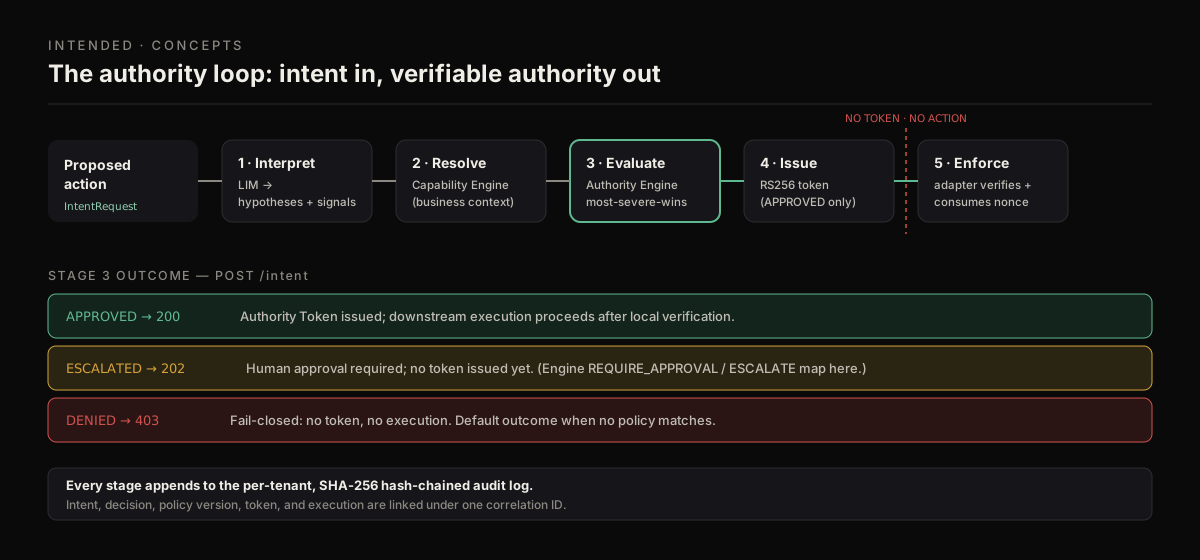
intent-submit / simulate feed the loop; escalations-* resolve held decisions; verify / inspect-token operate on the minted token; audit-query / audit-export read the resulting chain.
Command reference#
Every command prints the raw JSON API response to stdout and returns exit code 0 on a 2xx, 1 otherwise (verify returns 2 on an invalid token). Bracketed flags are optional.
Intents and simulation#
| Command | What it does | Key flags |
|---|---|---|
intent-submit | POST /intent — run an intent through the authority loop; returns APPROVED/ESCALATED/DENIED plus the decision token. | --tenant · --actor · --action · [--body <json>] |
simulate (alias intent-simulate) | POST /intent/simulate — evaluate an intent without recording it or minting a token. | --tenant · --actor · [--action] · [--risk] |
intent-compile | POST /intent/compile — compile natural language into a structured intent via the LIM. | --text · --tenant · --actor · [--domain] · [--target] |
POST /intent returns the legacy authority enum — APPROVED (HTTP 200), ESCALATED (202), or DENIED (403) — and, only on APPROVED, an authorityDecisionToken (an Ed25519 JWT, 300-second TTL, single-use). See the Intents API for the full response shape.
Domain LIM packs#
| Command | What it does | Key flags |
|---|---|---|
lim-packs-list | List available Domain LIM packs. | [--domain] · [--series] · [--status] |
lim-pack-install | Install a pack for a tenant. | --pack · --tenant · --actor · [--version] · [--config <json>] |
lim-installations-list | List installed packs for a tenant. | --tenant · [--status] |
lim-installation-enable / -disable / -deprecate / -remove | Move an installation through its lifecycle. | --id · --tenant · --actor · [--reason] |
lim-evaluate | Evaluate an intent IR against installed LIM packs. | --tenant · [--installation] · [--action] · [--evidence <json>] |
lim-explain | Explain a prior LIM evaluation. | --evaluation · --tenant |
Escalations#
| Command | What it does | Key flags |
|---|---|---|
escalations-list | List pending escalations for a tenant. | --tenant |
escalations-approve | Approve a held (escalated) decision. | --id · [--approved-by] · [--role] |
escalations-reject | Reject a held decision. | --id · --reason · [--rejected-by] · [--role] |
Audit#
| Command | What it does | Key flags |
|---|---|---|
audit-query | Read the tenant's hash-chained audit entries with optional filters. | --tenant · [--correlation] · [--event-type] · [--limit] · [--offset] |
audit-export | Export the signed evidence bundle for one intent. | --tenant · --intent |
Evidence is HMAC-signed with the tenant secret
audit-export returns an evidence bundle whose signature is an HMAC-SHA256 keyed off the tenant's own stored secret — verifying it requires possession of that secret. It is tamper-evident, not publicly/asymmetrically verifiable. See Audit API.
Tokens#
| Command | What it does | Key flags |
|---|---|---|
inspect-token (alias token-inspect) | Decode and print a JWT payload (no signature check). | --token |
verify (alias token-verify) | Cryptographically verify an Authority Token offline against a public key. | --token · --key · [--kid] · [--tenant] · [--adapter] |
verify calls @intended/verify, which enforces Ed25519, mandatory kid pinning, tenant/adapter/issuer/audience matching, clock-skew tolerance, and the 300-second max TTL. inspect-token only base64-decodes the payload for inspection and performs no verification — never trust its output as proof.
Policy packs#
| Command | What it does | Key flags |
|---|---|---|
deploy-policy (alias policy-pack-install) | POST /policy-packs/install — install a policy pack for a tenant. | --pack · --tenant |
policy-pack-inspect | List installed policy packs for a tenant. | --tenant |
See Policy commands for the full policy-pack workflow.
Live monitoring#
| Command | What it does | Key flags |
|---|---|---|
watch | Stream live decisions over SSE (GET /api/stream/decisions), color-coded and filterable. | --tenant · [--domain] · [--decision] · [--actor] · [--min-risk] |
Runtime policy#
| Command | What it does | Key flags |
|---|---|---|
perimeter-compile (aliases openshell-compile, nemoclaw-compile) | Compile an intent/LIM JSON file into NVIDIA OpenShell runtime policy YAML. | --input · [--output] · [--runtime] · [--provider] · [--preset] |
See NVIDIA OpenShell commands for the input shape and presets.
Demo / benchmarking commands
The CLI also ships business-intent-demo, business-intent-dataset, and business-intent-leaderboard for the Business Intent demo wedge. They are useful for evaluation and dataset generation but are not part of the core authority workflow; run intended help to see their flags.
Exit codes#
| Code | Meaning |
|---|---|
0 | Success — the API returned a 2xx, or the local operation completed. |
1 | Failure — non-2xx API response, a missing required flag, or a request error. |
2 | verify only — the token was structurally decodable but failed verification. |
See also#
- Policy commands — install and inspect policy packs from the CLI
- NVIDIA OpenShell commands — compile runtime policy YAML
- API Authentication — credential types and the fail-closed gate
- Intents API — the request/response contract behind
intent-submit