guides
Intended Documentation
Verify a Token
Verify an Authority Token before any downstream system acts on it — check the Ed25519 signature, the kid-pinned key, tenant and adapter binding, expiry, and single-use nonce.
Verify a Token#
An Authority Token is the cryptographic proof that an action was authorized. Before any downstream system executes the action, it must verify the token. A token that fails verification means do not act — the platform is fail-closed end to end.
The token is an Ed25519 JWT, signed by a per-tenant Ed25519 key, with a 300-second TTL and a single-use nonce. Verification checks the signature against the right key (pinned by kid), confirms the claims bind to the expected tenant and adapter, and enforces the time window. You can verify three ways: through the hosted POST /verify/token endpoint, with the @intended/verify library locally, or with the CLI.
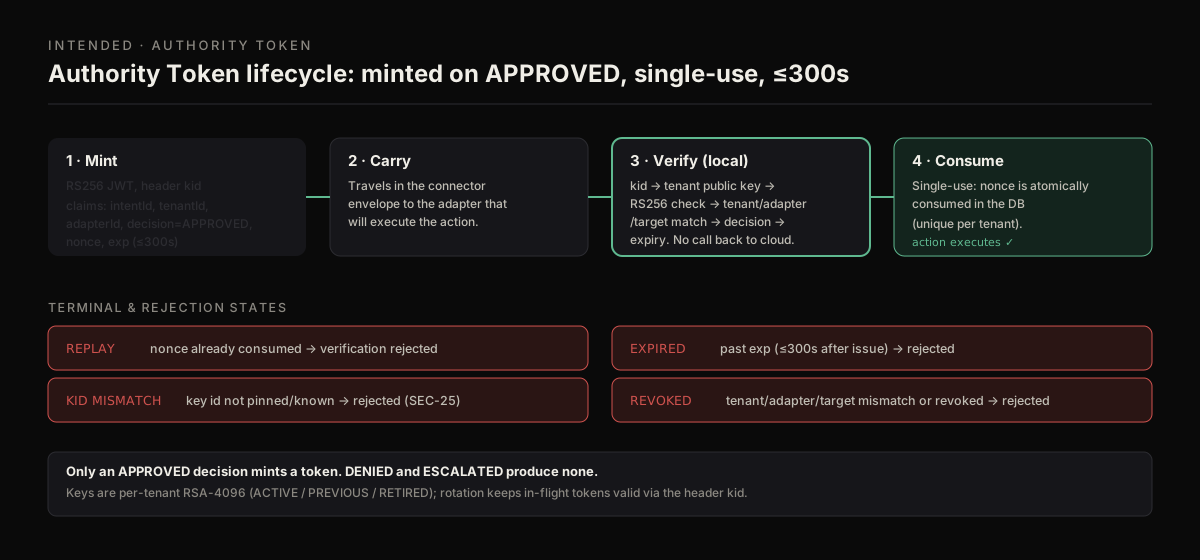
Mint on approval, verify against the kid-matched key, then consume the nonce. A replayed token fails the single-use check.
What gets checked#
verifyToken (the same logic behind the hosted endpoint and the CLI) enforces all of the following. Any failure returns valid: false with a specific reason:
| Check | Failure reason |
|---|---|
kid in the token header matches the expected key | KID_MISMATCH |
| Ed25519 signature is valid for the public key | SIGNATURE_VERIFICATION_FAILED |
| Claims parse into the Authority Token shape | TOKEN_CLAIMS_INVALID |
tenantId claim matches your expected tenant | TOKEN_TENANT_MISMATCH |
adapterId claim matches your expected adapter | TOKEN_ADAPTER_MISMATCH |
| Token is within its time window (60s clock skew allowed) | TOKEN_EXPIRED / TOKEN_USED_BEFORE_VALID |
| TTL does not exceed your configured maximum | TOKEN_TTL_EXCEEDS_LIMIT |
Pin the kid
Always pass the expected kid. Pinning the key id prevents an attacker from presenting a token signed by an unrelated or rotated key. The verifier rejects a mismatch before it even checks the signature.
Steps#
Fetch the tenant's public keys
Authority keys are per-tenant Ed25519 with statuses ACTIVE / PREVIOUS / RETIRED. Fetch the current set and select the one whose kid matches the token header.
The same keys are served as a standard JWKS at /.well-known/authority/:tenantId/jwks.json (also public, cacheable for 5 minutes).
The response is { "tenantId": "…", "keys": [ { "kid": "…", "publicKeyPem": "…", "status": "ACTIVE" }, … ] }. Decode the token header to read its kid, then pick the matching key. To inspect a token's header and claims without verifying:
Verify the token
Verify locally with the library, with the CLI, or through the hosted endpoint. All three run the same checks.
From the command line, verify returns exit code 0 when valid and exit code 2 when invalid, so it slots into CI gates:
Read the result
The hosted endpoint returns the verification verdict plus the parsed claims and header:
When valid is false, reason carries one of the codes from the table above and claims may be null.
Enforce the outcome and consume the nonce
valid: trueand the claims match what you expected — proceed with the action.valid: false— stop. Do not execute. Re-evaluate throughPOST /intentif the action still needs to happen.
A token is single-use: each carries a unique nonce. Intended never runs the action, so the service that acts on the token enforces single use: record each accepted (tenantId, nonce) pair (a unique constraint works well) and reject a token whose nonce you have already seen. Do this as part of acting, in this order: decode kid → select the public key → Ed25519-verify with kid pinning → assert tenant and target → assert decision === "APPROVED" → check expiry → consume the nonce → act.
If you verify through the hosted endpoint, Intended can record the use for you: send "consume": true (with expectedKid). The first such call for a valid token answers valid: true, consumed: true; any later one answers valid: false, consumed: false with reason TOKEN_ALREADY_CONSUMED, including concurrent calls. Without consume the hosted check is read-only and does not use the token up. Single use holds only where the acting service enforces it: with consume: true here, or with its own nonce record. A signature check alone accepts the same token for its whole lifetime. Note that an idempotent retry of POST /intent (same Idempotency-Key, within 24 hours) returns the original token again, which may already be consumed.
Errors from the hosted endpoint#
Beyond the verification reason codes above, the /verify/token route returns these before it even runs the cryptographic checks:
| Status | Code | Cause |
|---|---|---|
| 400 | INVALID_VERIFY_TOKEN_REQUEST | Body failed schema validation |
| 400 | VERIFY_CONSUME_REQUIRES_KID | consume: true was sent without expectedKid |
| 400 | VERIFY_TENANT_REQUIRED | No tenant context (send x-tenant-id or expectedTenantId) |
| 403 | TENANT_MISMATCH | expectedTenantId does not match your credential's tenant |
| 403 | VERIFY_KEY_NOT_FOUND | The expectedKid is not registered for this tenant |
| 403 | VERIFY_KEY_NOT_ACTIVE | The key exists but is RETIRED, not ACTIVE/PREVIOUS |
| 403 | VERIFY_PUBLIC_KEY_MISMATCH | The supplied PEM does not match the registered key for that kid |
Where to get the public key
/.well-known/jwks.json serves the physical-AI token signer, not per-tenant authority keys. To verify a per-tenant Authority Token, fetch the key from /tenants/:tenantId/authority-keys/public or the JWKS at /.well-known/authority/:tenantId/jwks.json (both public), or pass the PEM directly to verifyToken.
Next steps#
- Decision Token Model — the full token structure and trust model
- Quickstart — mint a token by submitting an intent
- API Authentication — credentials, headers, and errors