operator runbooks
Intended Documentation
Deploy and Rollback Policies
Promote a reviewed policy draft to an active version and roll back to a prior version — the real /policy/deploy/:draftId and /policy/rollback/:versionId lifecycle, plus the flat deploy-policy CLI. No fictional deploy command group.
Deploy and Rollback Policies#
This runbook covers the promotion end of the policy lifecycle: approving a reviewed draft, deploying it to an active version, and rolling back to a prior version when a change misbehaves. It picks up where Author a Policy and Simulate Impact leave off.
There is no `intended deploy …` command
Deployment and rollback run through the Policies API /policy/* lifecycle and the console. The CLI is flat: deploy-policy (alias policy-pack-install, which posts to /policy-packs/install) and policy-pack-inspect are the only deploy-adjacent verbs. There is no intended deploy status / approve / push / verify / rollback, no intended policy pin, and no per-deploy "decision token" — those do not exist. First-class deploy/rollback/pin CLI verbs are Roadmap.
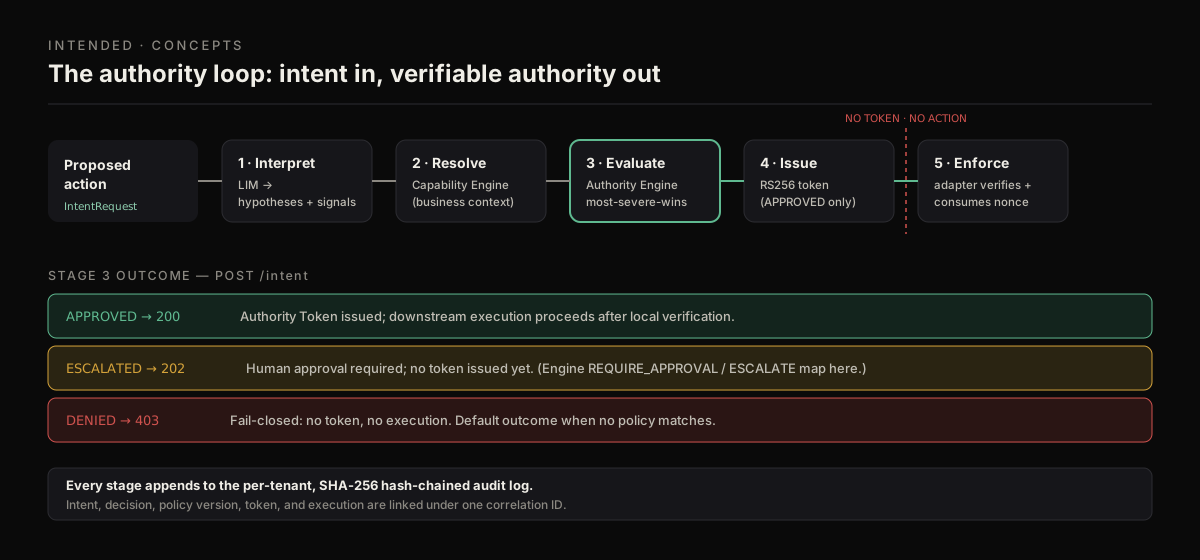
Deploying a draft replaces the policy version the runtime's evaluate stage consults on every request. Roll back to restore the prior version instantly.
Prerequisites#
- The
authority:policy:writepermission. Every lifecycle transition requires it, and each appends to the audit ledger. - A draft in the approved state. Deploy refuses to promote a draft that has not been approved.
- Tenant scope aligned across credential,
x-tenant-id, and bodytenantId(else403 TENANT_MISMATCH).
The lifecycle, end to end#
The governed promotion path is a fixed sequence. Each step is an explicit API call (or console action) — nothing auto-promotes.
| Step | Call | Result |
|---|---|---|
| 1. Submit to review | POST /policy/drafts/:id/review | Draft enters review. |
| 2. Approve | POST /policy/drafts/:id/approve | Draft becomes deployable. |
| 3. Deploy | POST /policy/deploy/:draftId | Draft becomes the active version. |
| 4. Roll back | POST /policy/rollback/:versionId | A prior version becomes active again. |
Reject instead of approve with POST /policy/drafts/:id/reject. Read state at any point with GET /policy/drafts/:id and GET /policy/packs/:pack/versions.
Step 1 — Approve the draft#
A reviewer who holds authority:policy:write approves. Separation of duties (author ≠ approver) is a process control you enforce in review; honor it.
Tip
Read the draft impact summary one last time before approving — GET /policy/drafts/:id/impact-summary. Approving on a stale or lowData projection is the most common way a bad change reaches production.
Step 2 — Deploy#
Promote the approved draft to the active version.
Deploy the draft
The response is the newly active policy version. From this point, every /intent and /authority/evaluate for the tenant consults it.
Confirm what is active
Inspect the deployed versions for the pack:
The CLI offers a read-only inspection of installed policy packs:
Watch the runtime
After deploy, watch live decisions to confirm the change behaves as the impact summary projected:
A sudden cluster of denials right after deploy is the signal to roll back.
Step 3 — Roll back#
If the deployed version misbehaves, restore a prior version. Roll back first, investigate second — do not fix-forward under pressure.
Danger
If you see unexpected denials or a spike in escalations after a deploy, roll back immediately. Rollback restores a known-good version atomically; debugging a live production policy under load is how a small regression becomes an outage.
:versionId is the prior version you want to restore — find it via GET /policy/packs/:pack/versions. The rollback appends to the audit ledger like every other transition.
Version pinning is Roadmap
There is no version-pin endpoint or intended policy pin command today. To freeze a policy, govern it through your change process and roll back any unwanted deploy. A first-class pin/hold control is Roadmap.
Failure modes#
| Status | Code | Cause |
|---|---|---|
400 | validation | Body failed schema (missing deployedBy / rolledBackBy, etc.). |
400 | TENANT_MISMATCH | Body tenant ≠ header/credential tenant. |
401 | UNAUTHORIZED | No valid credential. |
403 | FORBIDDEN | Missing authority:policy:write. |
409 | conflict | Deploying a draft that is not in the approved state. |
404 | not found | Draft or version id not found for this tenant. |
Next steps#
- Simulate Impact — always read the impact summary before the next deploy.
- Incident Response — what to do when a deployed change causes an incident.
- Control Center — monitor runtime health after deployment.