operator runbooks
Intended Documentation
Incident Response
Contain and investigate an authority incident — query the SHA-256 audit chain, inspect and verify an Ed25519 decision token, and use the emergency-control actions (tenant/environment halt, connector pause, token revoke) to stop execution. No fictional kill-switch or incident CLI.
Incident Response#
This runbook covers containing and investigating an authority incident: reading the audit chain, inspecting the decision token behind a specific outcome, and using the emergency-control actions to stop execution. Containment first; investigation second.
Danger
During an active incident, prioritize containment over investigation. If execution is misbehaving, halt the affected scope first (tenant or environment), then investigate. The emergency-control actions are the real stop mechanism — see Step 3.
What does and does not exist
There is no intended emergency kill/lift/status, no intended incident create/report/update/list, and no intended audit trace. Real verbs: audit-query and audit-export (CLI), inspect-token and verify (CLI), and the emergency-control API POST /admin/emergency-controls/:action. Decision tokens are Ed25519 (EdDSA) JWTs, not RS256 or ES256. A first-class incident-management CLI is Roadmap.
Severity and first action#
| Severity | Description | First action |
|---|---|---|
| Critical | Unauthorized or dangerous execution in production | environment_halt immediately, then investigate. |
| High | Authorization failures blocking critical services | Check recent deploys; roll back if correlated. |
| Medium | Unexpected decision pattern (e.g. deny/escalate spike) | Query the audit chain for the window. |
| Low | Audit anomaly, non-blocking | Investigate within the working day. |
Step 1 — Query the audit chain#
Every decision and execution writes to a per-tenant, SHA-256 hash-chained audit log. Start every investigation by querying the affected window.
Confirm the chain is intact#
A run of unexplained denials, or any suspicion of tampering, warrants a chain-integrity check. The verifier recomputes each entry's content hash and its linkage to the prior entry.
Tip
A deny/escalate spike clustered on one policy shortly after a deploy almost always means a policy regression. Cross-reference GET /policy/packs/:pack/versions and roll back — see Deploy and Rollback.
Step 2 — Inspect the decision token#
When a specific intent was APPROVED, the runtime minted an Authority Decision Token — an Ed25519 JWT, 300-second TTL (default and max), single-use via a unique nonce. Inspect it to see exactly what was authorized, and verify it to confirm it is genuine and unexpired.
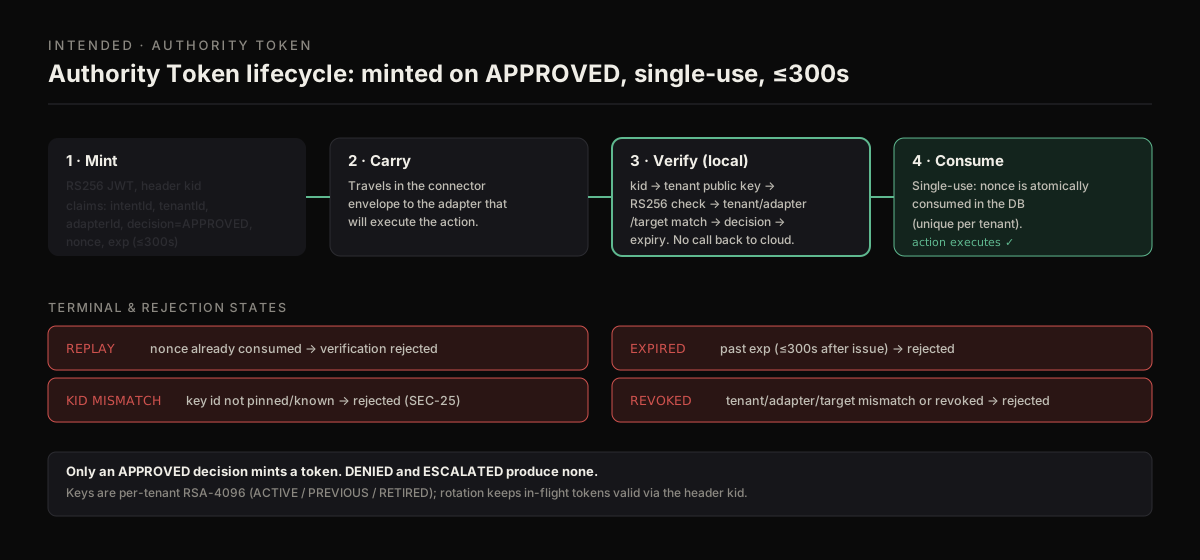
During an incident, decode the token to read what was authorized, then verify it to confirm the Ed25519 signature, the 300s expiry, and the tenant/adapter binding — and whether its single-use nonce was already consumed.
Decode the claims#
inspect-token decodes the JWT payload without verifying — fast for reading what a token claims.
Verify it cryptographically#
To confirm the token is genuine, unexpired, and bound to the expected tenant/adapter, verify it against the tenant's Ed25519 public key with kid pinning.
Note
The connector that ran the action already performed this verification — BaseAdapter.execute() is fail-closed and refuses to run if the token's signature, expiry, tenant/adapter binding, or single-use nonce fails. Re-verifying during an incident tells you whether the token itself was sound, separating a policy problem from a token problem.
Step 3 — Contain with emergency controls#
The real stop mechanism is the emergency-control API, POST /admin/emergency-controls/:action. It requires the emergency:invoke permission (held only by owner and admin), a required reason recorded to the event ledger, and the usual tenant-match. Full reference: Emergency Controls.
Halt the affected scope
| Action | Use when |
|---|---|
tenant_halt | The whole tenant must stop. |
environment_halt | Contain one environment (needs environmentKey). |
connector_pause | One integration is the problem — forces its capability policies to observe (needs targetRef). |
token_revoke | A credential is compromised (needs targetRef = credential id). |
Revoke a compromised credential
Resume once contained
After the root cause is remediated, lift the halt with the matching resume action (environment_resume, tenant_resume, connector_resume). The handler is fail-closed: if the mutation fails, the event is still recorded with status: failed.
Danger
A halt denies execution across the scope, including legitimate operations. Use it when the risk of continued execution outweighs the impact of a full stop, scope as narrowly as the incident allows (prefer connector_pause over tenant_halt when one integration is at fault), and always supply a meaningful reason — it is required and lands in the event ledger.
Step 4 — Investigate and resolve escalations#
If the incident involved intents that were ESCALATED, work the escalation queue rather than leaving them pending.
Use escalations-approve only for escalations you have confirmed are legitimate and unrelated to the incident.
Step 5 — Evidence and post-mortem#
Export a self-contained evidence bundle for any intent central to the incident. The bundle's integrityHash is a SHA-256 over its events; its signature is an HMAC-SHA256 keyed off the tenant's own secret — so it is tamper-evident and verifiable by anyone holding that tenant secret, not publicly/asymmetrically verifiable. State that precisely in your write-up.
| Root cause | Indicators | Resolution |
|---|---|---|
| Policy regression | Deny/escalate spike after a deploy | Roll back, fix the draft, re-simulate, redeploy. |
| Connector fault | One integration's actions failing | connector_pause, fix, connector_resume. |
| Credential compromise | Unexpected actor in the audit chain | token_revoke, rotate, tighten scope. |
| Token problem | verify fails on a token that ran | Investigate the signer/key rotation; check kid. |
Incident records are Roadmap
There is no built-in incident-ticket store or intended incident … command. Track the incident in your own system of record and attach the exported evidence bundle and the emergency-control event log. A native incident object is Roadmap.
Incident checklist#
- [ ] Assess severity; notify on-call.
- [ ] If critical:
environment_halt(or narrower) immediately. - [ ] Query the audit chain for the window; verify chain integrity.
- [ ] Inspect and
verifythe decision tokens behind anomalous outcomes. - [ ] Cross-reference recent policy deploys; roll back if correlated.
- [ ] Contain: emergency control + rollback as needed.
- [ ] Work the escalation queue.
- [ ] Export evidence bundles; write the post-mortem.
- [ ] Resume the halted scope once remediated; verify the runtime is healthy.
Next steps#
- Emergency Controls — the full containment-action reference.
- Deploy and Rollback — roll back the deploy behind a regression.
- Decision Token Model — what the Ed25519 token proves and why.