security
Intended Documentation
Emergency Controls
Tenant containment actions — halt/resume a tenant or environment, revoke a credential — with exact action names, required permission, side effects, and the event ledger.
Emergency Controls#
Emergency controls are the break-glass actions for containing an incident inside a tenant. They are exposed through the enterprise admin surface, restricted to the highest-privilege roles, and every invocation — success or failure — is recorded in a dedicated event ledger.
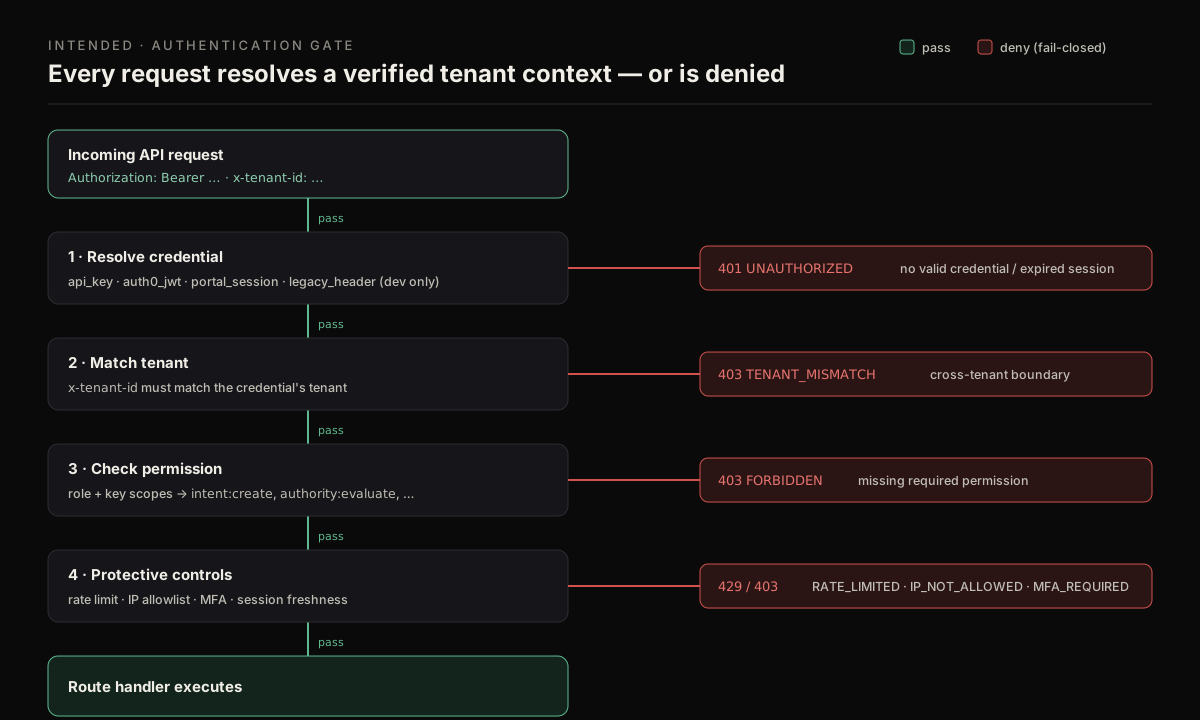
Emergency actions clear the same fail-closed gate as every other call, then an additional emergency:invoke permission check, before any containment effect is applied.
Authorization#
Every emergency action requires the enterprise permission emergency:invoke, held only by owner and admin. Reading the emergency event log requires trust:read (every role). As with all admin routes, the credential's tenant, x-tenant-id, and the body tenantId must agree, or the call is rejected with 403 TENANT_MISMATCH.
These actions take effect immediately and tenant-wide
A tenant_halt puts the tenant into maintenance; an environment_halt flips a whole environment to halted; a token_revoke invalidates a live credential. Confirm the tenant and target before you invoke, and always pass a meaningful reason (it is required and is written to the audit ledger).
There is no CLI for this#
No `intended emergency …` command exists
The Intended CLI is a flat set of hyphenated commands and has no emergency-control command group. Emergency actions are invoked over the admin API (POST /admin/emergency-controls/:action) shown below, or from the account console. Do not script against an intended emergency … command — it does not exist.
Read current emergency state#
Invoke an emergency action#
The actions#
| Action | Effect | Extra field |
|---|---|---|
tenant_halt | Marks the tenant halted in maintenance state; activates maintenance if any tenant is halted | — |
tenant_resume | Clears the tenant's halted state | — |
environment_halt | Sets the named environment to halted and records haltedAt/haltedBy | environmentKey (required) |
environment_resume | Returns the named environment to active | environmentKey (required) |
token_revoke | Revokes the referenced API credential and writes a credential-event | targetRef = credential id |
The emergency event ledger#
Each invocation creates an emergencyControlEvent with: action, status (executed · failed · reverted), environmentKey, targetRef, reason, requestedBy, metadata, and timestamps. The event is written whether or not the underlying mutation succeeded — a failed action records status: failed with the error in its metadata, so there is no silent failure. These events appear in GET /admin/emergency-controls and flow into the trust overview's emergencyEventCount7d and into audit evidence exports.
Failure modes#
| Status | Code | Cause |
|---|---|---|
| 400 | INVALID_ADMIN_EMERGENCY_CONTROL_ACTION_REQUEST | Unknown action, missing reason, or malformed body |
| 400 | ENVIRONMENT_KEY_REQUIRED | environment_halt/resume without environmentKey |
| 400 | TARGET_REF_REQUIRED / INVALID_TARGET_REF | token_revoke without a valid targetRef |
| 401 | UNAUTHENTICATED_ACTOR | No resolvable actor on the request |
| 403 | TENANT_MISMATCH | x-tenant-id ≠ body tenantId |
| 403 | FORBIDDEN (+ permission: "emergency:invoke") | Role is not owner/admin |
| 404 | CREDENTIAL_NOT_FOUND | token_revoke target credential is not in this tenant |
Targets that match nothing fail closed and are recorded
If an environment_* action matches no records (e.g. an unknown environment), the action is recorded as failed with the specific error in its metadata rather than reported as a success. Read the returned event's status and metadata.error to confirm the action took effect.